 TwinPane engineering
The short answer
- Drive redirection is request and response. Every open, read, listing and close on
\\tsclientis a message the session host sends to your PC and waits for. - Folder listing multiplies the wait. Clients answer directory queries a few entries at a time (FreeRDP answers with exactly one), so big folders cost thousands of round trips.
- It shares the pipe. File traffic travels inside the RDP connection with screen updates, input and audio, in 1,600-byte virtual channel chunks by default.
- TwinPane batches and caches. Listings come 500 entries per request, file details come from cache, scanners read the cache, and opening a file is one encrypted whole-file transfer on TwinPane's own connection.
The symptom
What slow drive redirection looks like
You know it when you see it. Someone in an Azure Virtual Desktop, Remote Desktop Services or RemoteApp session opens This PC, clicks C on LAPTOP-4F2K, and drills into a project folder. The address bar fills with a slow green bar, the list says Working on it..., and files trickle in a handful at a time. Sorting by date restarts the wait. A Save As dialog in a published app freezes while it reads the same folder.
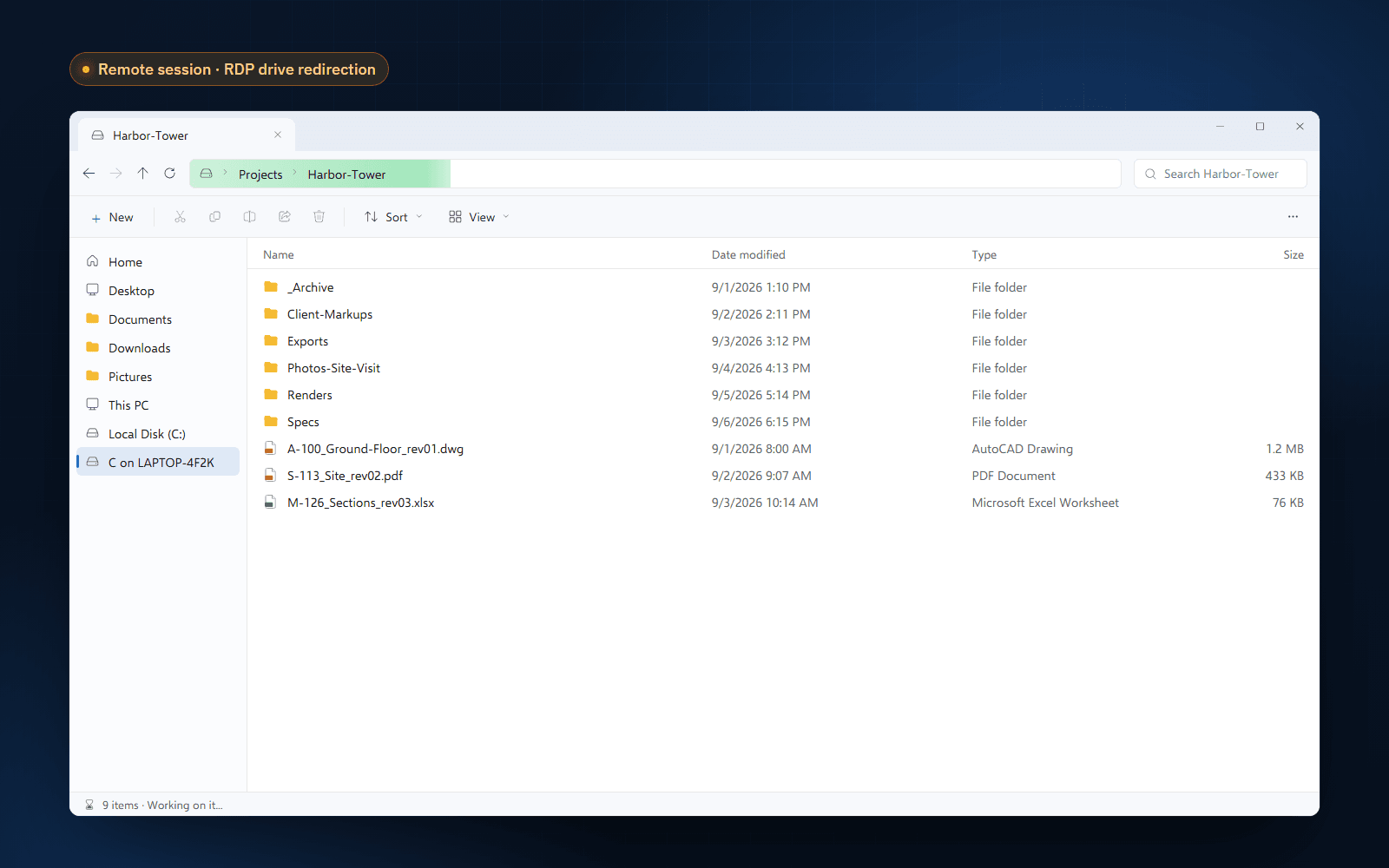
The usual pattern behind the tickets:
- Small folders are fine, large folders are painful, and the pain grows with the number of files more than their size.
- Users far from the session host (another region, home Wi-Fi, a VPN) feel it most.
- It gets worse when the session is busy: a video call, a big spreadsheet repainting, several monitors.
- Opening a large file straight from the redirected drive is slow, and saving back can stall the app.
Under the hood
How RDP drive redirection moves files
Drive redirection is defined in Microsoft's File System Virtual Channel Extension (MS-RDPEFS). Your PC announces its drives to the session host, which exposes them as \\tsclient\C, \\tsclient\D and so on, shown in Explorer as C on <your PC>.
No files are copied ahead of time. Whenever a program on the host touches the redirected drive, the host's redirector turns the Windows file system call into a device I/O request (create, query information, read, write, query directory, close) and sends it to your PC. Your RDP client performs the operation on the real disk and sends back the result. The program waits for the reply.
Those requests travel over the RDP connection as a static virtual channel, multiplexed with everything else the session does: graphics updates, keyboard and mouse input, audio, clipboard and printers. Virtual channel data is cut into chunks of 1,600 bytes by default (MS-RDPBCGR), and the session has one connection to share.
The bottleneck
Why folder listing is the slowest part
Reading one big file is mostly a bandwidth problem. Listing a folder is a latency problem, and latency is what remote sessions have plenty of.
To list a folder, the host sends a Query Directory request, your PC replies, the host asks for the next entries, and so on until your PC answers that there are no more files. How many entries go into each reply is up to the client. FreeRDP, the open-source RDP client, puts exactly one entry in each reply: a folder of 2,000 files costs 2,001 round trips before Explorer even has the list.
Then Explorer does what Explorer does, and each of these is more requests across the same link:
- Icons and overlays. For many file types Explorer opens the file to find the right icon or overlay.
- Columns and properties. Views showing authors, dimensions or durations read metadata from inside each file.
- Thumbnails and the preview pane. Large icon views and previews read file contents.
- Antivirus on the host. Real-time protection on the session host can scan files from the redirected drive as programs open them, reading their content over the link.
- Change notifications. Explorer asks to be told when the folder changes, and refreshes when it is.
Do the math
The round-trip model
A useful rule of thumb: listing time ≈ round trips × round-trip time. Bandwidth barely matters, since each reply is a few hundred bytes. Move the sliders to see how quickly the numbers run away from you, and how batching changes them.
Interactive model
How long does it take to list one folder?
A model, not a measurement. It counts directory round trips only, assuming the client returns one entry per response as FreeRDP does, and ignores bandwidth. Real Explorer sessions add more requests per file for icons, columns and previews, which widens the gap. TwinPane request time covers both hops through the TwinPane service, so it is set higher than the RDP round trip by default.
At 40 ms, a typical figure for a session host in a nearby cloud region, a 2,000-file folder spends 80 seconds on listing round trips alone in this model. Halve the latency and you halve the wait, but you are still paying per entry. That is the core problem: the cost grows with the number of files, and there is no setting that turns it into a batch.
Compounding factors
What makes it worse
Distance between user and session host
Every millisecond of round-trip time is paid once per request. A user in Lisbon on a session host in West Europe has a very different day from a user on a session host in East US, with the same folder.
A busy session
Drive traffic shares the connection with screen updates. When the screen is busy (video, scrolling a large sheet, several monitors), file requests wait their turn, and heavy file traffic in turn makes the screen feel sluggish.
Wide folders and deep trees
Engineering drawings, photo dumps, export folders and mail archives often hold thousands of files in one place. Search and "calculate folder size" walk every subfolder, multiplying the round trips again.
Published apps and file dialogs
In RemoteApp and Citrix published apps, users meet the redirected drive in Open and Save As dialogs. A dialog that lists the folder synchronously freezes the app until the listing is done.
Before you buy anything
Fixes to try first
These help, cost nothing and are worth doing whether or not you ever install TwinPane:
- 1
Lower the latency. Put session hosts in the region closest to users, and on Azure Virtual Desktop enable RDP Shortpath so the session uses UDP. Every request gets cheaper.
- 2
Redirect only the drives people need. Set the drivestoredirect RDP property to specific drives instead of *, so Explorer and file dialogs have fewer remote drives to probe.
- 3
Use Details view and switch off previews. Fewer columns, no thumbnails and a closed preview pane mean fewer reads per file.
- 4
Keep working folders small. Split folders with thousands of files into subfolders, or archive old revisions.
- 5
Copy, then open. For large files, copy them to the session host once and work on the copy, instead of opening them in place over the redirected drive.
If your policy disables drive redirection altogether, none of this applies: there is no \\tsclient to tune. Our guides on AVD local drives not showing and Citrix client drive mapping cover that case.
The TwinPane approach
How TwinPane does it instead
TwinPane doesn't try to make drive redirection faster. It replaces the path. The TwinPane Server runs in the remote session and mounts your PC as the Client PC (X:) drive, and can point the session's Desktop, Documents and Downloads at your PC's own folders. The TwinPane Client on your PC answers. Between them runs TwinPane's own backbone: both sides connect outbound to the TwinPane service, messages and files are encrypted end to end, and the RDP connection is left to do what it is good at, the screen.
The design choices that matter for speed:
Listings in batches of 500
One request returns up to 500 entries with name, type, size and modified time. A 2,000-file folder takes four requests, not two thousand round trips.
Metadata from the listing
When Explorer asks about a single file, the answer comes from the parent folder's cached listing. Parallel requests for the same folder are merged into one.
Scanners read the cache
Defender, Windows Search and other processes that sweep folders get cached listings. TwinPane refreshes them in the background and tells Explorer about changes.
Read-ahead and compression
Reads fetch 2 MB blocks ahead and keep them for 30 minutes. Compressible data is compressed; Office, PDF, image, video and archive formats are sent as they are.
Whole-file opens
Double-click a file in the session and it travels to your PC in one encrypted transfer, is checked against its SHA-256 hash and opens in your local app.
Off the RDP connection
Client and Server connect outbound to the TwinPane service. RDP carries the screen and input; files never compete with them, and redirection can stay disabled.
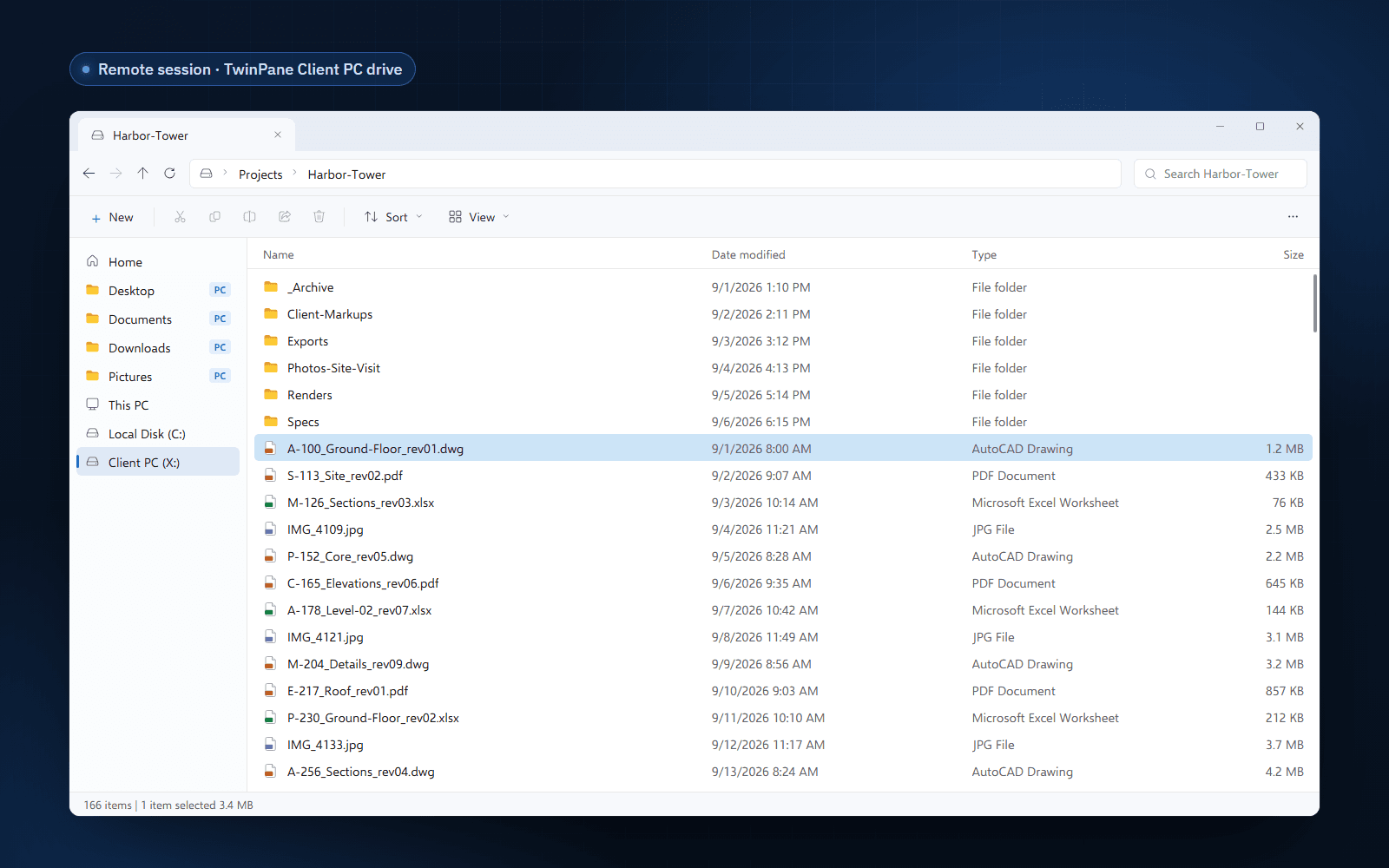
Encrypted end to end, outbound only
The Server and Client agree on keys with P-256 ECDH and encrypt with AES-GCM; files in transit are sealed in 1 MB segments and checked against a SHA-256 hash when they arrive. Neither side listens on an inbound port, so there is no inbound firewall rule to open on the PC or the session host. Because TwinPane runs outside RDP and ICA virtual channels, your Group Policy for drive and clipboard redirection stays exactly as it is. The security overview has the details.
Head to head
Side by side
| RDP drive redirection | TwinPane | |
|---|---|---|
| Folder listing | Request and response per entry (one entry each in FreeRDP) | Up to 500 entries per request |
| Details for each file | More requests to your PC | Answered from the cached listing |
| Antivirus and Search sweeps | Every sweep crosses the link | Served from cache, refreshed in the background |
| Transport | Inside the RDP connection, in 1,600-byte virtual channel chunks by default | Its own outbound connection; RDP keeps the screen |
| Open a file in a local app | Copy it across, then open it yourself | Double-click; one whole-file transfer, hash checked |
| Works with redirection disabled by policy | No, it is the redirection | Yes |
| Encryption | RDP's TLS between client and host | End to end, P-256 key agreement and AES-GCM |
| Client devices | Most RDP clients, including macOS and Linux | Windows PCs |
| Needs internet access | No, works on an isolated LAN | Yes, outbound to the TwinPane service |
The full product comparison, including deployment and licensing, is on TwinPane vs RDP drive redirection.
Why is \\tsclient so slow to browse?+
Every file operation on a redirected drive is a request that the session host sends to your PC through the RDP connection, and your PC answers. A folder listing is a series of these exchanges, and an open-source client such as FreeRDP returns one entry per answer. A folder with thousands of files therefore needs thousands of round trips before Explorer has the full list, and Explorer then asks for more per file.
Why does File Explorer say "Working on it..." on a redirected drive?+
Explorer shows "Working on it..." and the green bar in the address field while it is still enumerating the folder. On a redirected drive the enumeration waits on round trips to your PC, so the message stays up for as long as the latency and the number of items require.
Does RDP Shortpath or UDP make drive redirection fast?+
It helps. Drive redirection runs inside the RDP connection, so a transport with lower latency shortens every round trip. It does not change the number of round trips, so large folders are still slow when the session host is far from the user.
Does TwinPane need drive redirection to be enabled?+
No. TwinPane uses its own connection, outside RDP and ICA virtual channels. You can keep drive and clipboard redirection disabled by Group Policy or Intune and still give users their local folders and local file opening.
Is TwinPane faster on every network?+
No. On a fast LAN with small folders, drive redirection is quick and the difference is small. TwinPane makes the biggest difference with large folders, higher latency, published apps and locked-down policies.
Are my files stored by TwinPane?+
Files are encrypted end to end between the TwinPane Server and Client. When you open a file locally, the encrypted transfer object is deleted after your PC has downloaded it and checked its SHA-256 hash.
How TwinPane works
Pairing, the Client PC drive, Mirror Mode and local file opening.
Save to your PC with Mirror Mode
Make the session's Desktop, Documents and Downloads your PC's own.
RemoteApp without drive redirection
File workflows in published apps when redirection is blocked.
AVD file redirection alternative
TwinPane on Azure Virtual Desktop host pools.